The new world is ready for download. Good luck getting a connection to the servers, they're burning up!
Valerian


Tuesday, June 30, 2009


Sunday, June 28, 2009
Wizard Secrets Part 2
How can I log two different wizards into to Wizard101 using the same computer?
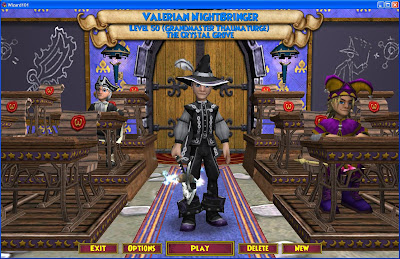
2) Set your video settings to a lower number to allow you to better use your computer's desktop space
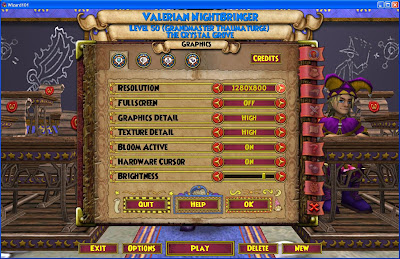 3) Set your full-screen option to OFF so that you can switch between windows by clicking the window you want with your mouse.
 4) Log your other character in (note this cannot be a character who is on the same login username and password as your first). This character must be a character who has a DIFFERENT login username and password.
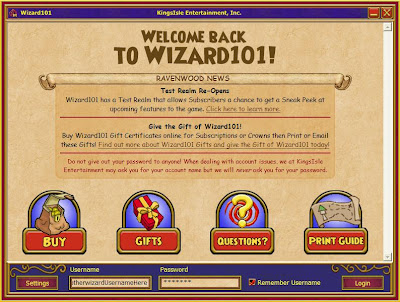 5) Once your second wizard is logged in you can start playing together with a little window switching. If you have two computer monitors you can drag a window to each side allowing you a smooth transition between copies of the program.
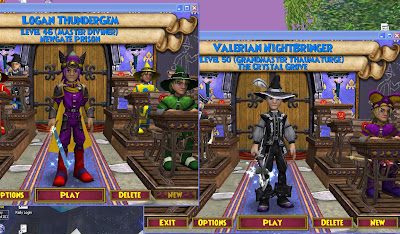
If you have two wizard accounts (with unique user names) you can log into wizard101 twice even on the same computer! If your computer is fast enough and your video card can support a high resolution you can run two copies of wizard at the same time.
Why would you want to do this? If you want to be able to help yourself with quests, trade cards to and from another wizard without using a friend as a go between. You could even join yourself in the arena. (interesting idea :)
What to watch for when you are trying to do this on a single computer is to load the game fully to your character selection screen before starting the program again. If you don't get past the loader the program will tell you another copy is running and it will refuse to start. If you load one character fully you can safely start the new game and new login without problems.
See the following pictures for how to run an switch between copies/characters.
1) Log one character in fully
2) Set your video settings to a lower number to allow you to better use your computer's desktop space
3) Set your full-screen option to OFF so that you can switch between windows by clicking the window you want with your mouse.4) Log your other character in (note this cannot be a character who is on the same login username and password as your first). This character must be a character who has a DIFFERENT login username and password. 5) Once your second wizard is logged in you can start playing together with a little window switching. If you have two computer monitors you can drag a window to each side allowing you a smooth transition between copies of the program.Wizard Secrets Part 1
The following secret was one I learned from Grace Dragonrider.
How I get my potions filled quickly?
Play potion motion up to level 3 then quit for each potion you need filled.
Play one additional time if your mana orb is not currently full.
To get potion motion action started quickly pull the middle two columns down until a few items line up, after that you can quickly drag rows left and right to quickly make matches that will get you very quickly to level 2 if no 3 without any serious thought or effort.
So next time you need to do an instance you can fill up in a couple minutes!
Vale
How I get my potions filled quickly?
Play potion motion up to level 3 then quit for each potion you need filled.
Play one additional time if your mana orb is not currently full.
To get potion motion action started quickly pull the middle two columns down until a few items line up, after that you can quickly drag rows left and right to quickly make matches that will get you very quickly to level 2 if no 3 without any serious thought or effort.
So next time you need to do an instance you can fill up in a couple minutes!
Vale
Wednesday, June 24, 2009
Test Realm Update
The test realm was updated with significant fixes. As many of you noticed there were some strange things going on. It seemed like they fixed the personal text chat a few days back but some friends and I got to see a group of bosses cheat their way through a battle by not loosing any pips after a spell cast, which would have been funny if it hadn't been so frustrating. We also saw some interesting features of the chat window which seemed to sometimes keep you from being able to click on the boss and rather would pop up the profile of the friend you most recently texted.
I'm hoping some of these strange things have been fixed and look forward to seeing you on test.
~Valerian
I'm hoping some of these strange things have been fixed and look forward to seeing you on test.
~Valerian
Saturday, June 20, 2009
More Open Chat Option For Wizards 18+ Years Old
To get slightly more open chat ability there is an option available in parental controls that can allow you to talk with slightly more freedom.

The setting in the parental controls area looks like this when it's enabled.
The downside to this option is that there are a lot of restrictions on it:
1) The user must be 18 or older
2) The user must have a subscription
3) The user must have a credit card on the account (and possibly be the sole account owner)
4) The user must have used the credit card on file to make a purchase through the wizard site
~Vale
Subscribe to:
Posts (Atom)